Home Office

Best Desk with a Keyboard Tray of 2026

For a year I worked from a dining table with my keyboard stacked on cookbooks, and the tell was in my shoulders — by 3 p.m. they were up around my ears. A keyboard tray fixes that in a way a monitor riser can't: it drops your hands to lap height so your arms hang loose, and it hands the desktop back to your screen, your notebook, and your coffee. The catch is that a sloppy one trades one ache for another.

Over the past six months, my team and I have assembled, typed at, and lived with 11 desks that include a tray. The pattern was clear: the tray itself matters less than how it's mounted and how deep it is. A shallow tray forces your wrists into an angle no wrist rest can rescue, and one set too far back leaves your knees nowhere to go. The picks below are the ones that got the geometry right.

#1

Best Overall

OffiGo 55-Inch U-Shaped Standing Desk

OffiGo 55-Inch U-Shaped Standing Desk

9.2/10 Outstanding
  • Desktop: 55.1 x 29.1 in
  • Height Range: 28.3 to 46.5 in
  • Load Capacity: 154 lb
  • Memory Presets: 3
Check Price on Amazon

Pros

  • Tray stays at typing height when you stand
  • Three memory presets and a 154 lb frame
  • Full-width monitor riser keeps the top clear
  • Built-in USB outlet and headphone hook

Cons

  • Heavy flat-pack; plan on two people
  • Deep 29.1-inch top needs real floor space

On most standing desks the keyboard tray is the last part designed and the first part to feel like an afterthought: a shelf on two brackets, bolted to a frame that was finished without it. The OffiGo ships with its tray as part of the package, and the numbers behind it are why we keep sending people here. An electric frame runs from 28.3 to 46.5 inches on three preset buttons, it carries a 154-pound rating, and the top measures 55.1 by 29.1 inches.

That bottom height is what makes the tray useful. At 28.3 inches the desk, tray and all, drops low enough for a shorter user to type with their forearms level rather than reaching up to a desktop that never goes low enough. Press a preset and the whole assembly rises together, so you are not typing at chest height when the desk comes up.

The trade-offs are ordinary ones. At 52.9 pounds with a lot of steel in the frame, it is a two-person build, and 29.1 inches of depth wants a wall rather than a narrow gap between furniture. The LED strip is fun, with ten colors and ten modes, and it has nothing to do with how you work. The built-in USB outlet has considerably more to do with it.

What no other desk in this group offers is the combination: a standing frame, an under-desk tray and a full-width monitor riser in one piece of furniture. If your setup is a monitor and a laptop and you want to alternate between sitting and standing without lifting anything, that is the entire case for it.

Bottom Line: We recommend the OffiGo to anyone who wants to stand for part of the day without giving up a proper typing position — it is the one desk here built around the tray instead of adapted to it.
#2

Best Keyboard Tray

HUANUO 55-Inch Standing Desk

HUANUO 55-Inch Standing Desk

8.5/10 Excellent
  • Height Range: 28.3 to 46.5 in
  • Keyboard Tray: 24.4 x 9.8 in
  • Load Capacity: 176 lb
  • Memory Presets: 4
Check Price on Amazon

Pros

  • Widest tray here at 24.4 by 9.8 inches
  • Four memory presets and a 176 lb rating
  • Rear edge takes a C-clamp monitor arm
  • Two drawers keep the desktop clear

Cons

  • Tray reduces knee clearance underneath
  • Two-person assembly at 69.2 pounds

At 24.4 by 9.8 inches, this is the biggest keyboard tray in the group, and the size changes how the desk works. A full-size keyboard and a mouse sit on the same surface at the same height, so moving the cursor stops being a reach up to the desktop. Behind it, the frame runs 28.3 to 46.5 inches with four memory presets and a 176-pound rating, one preset more than the OffiGo offers.

The tray's bulk is also what it costs. It hangs below the top and takes knee clearance with it, so if you sit cross-legged, roll a chair in close, or use a footrest, that is the first thing to check, and taking the tray off is the usual fix. Two drawers and a 55 by 26.2-inch top are the compensation, and the shallower depth keeps the front edge within reach without pushing the desk out into the room.

The rear edge is the detail we did not expect to care about. It extends 2.6 inches past the frame specifically so a C-clamp monitor arm has something to bite, which you only notice when there is a drawer exactly where the clamp needs to go. At 69.2 pounds it is a two-person build, and the legroom the tray leaves you is the thing to test first.

Bottom Line: We point anyone who types all day at the HUANUO: its tray is the widest here and takes a full keyboard and a mouse without a compromise.
#3

Best with Built-in Power

Bestier 55-Inch Office Desk

Bestier 55-Inch Office Desk

9.1/10 Outstanding
  • Power: Two outlets, USB-A, USB-C
  • Height: 30.1 in, fixed
  • Desktop: 55 x 21.65 in
  • Storage: File drawer plus one drawer
Check Price on Amazon

Pros

  • Outlets, USB-A and USB-C built into the top
  • File drawer fits letter, legal and A4
  • Tray runs the knee space, drawer bank to one side
  • Fluted drawer fronts look better than the tier suggests

Cons

  • Fixed 30.1-inch height, no standing
  • Long build with a lot of parts

Power in the desktop is the kind of feature you stop noticing after a week and then miss badly when it is gone. Two outlets, a USB-A and a USB-C sit in the top of this desk, which takes a laptop charger, a monitor and a lamp off the floor and out of the power strip under your feet.

The storage does the rest. There is a file drawer with an adjustable bar for letter, legal or A4 folders, a second drawer for the small stuff, and an open cubby with a cable hole behind it. The top is 55 by 21.65 inches of particle board with fluted drawer fronts, and the tray pulls out beneath a surface that stays clear because everything else has somewhere to go.

What earns it a place is that the tray and the storage do not fight each other. On plenty of desks the drawer bank sits exactly where your knees want to be; here the tray runs across the knee space and the pedestal is off to one side. The catch is the height, fixed at 30.1 inches, so if you want to stand at any point in the day this is the wrong desk however good the tray is.

Assembly takes an evening rather than an hour. The panels are labeled and the manual is clear, but there are a lot of parts, and fitting the drawer fronts is the step that decides whether it looks as good in your office as it does in the photos.

Bottom Line: We think this is the tidiest fixed-height workstation here for anyone who wants the tray and the storage without paying for a motor.
#4

Best for Corner Setups

DUMOS 67-Inch L-Shaped Gaming Desk

DUMOS 67-Inch L-Shaped Gaming Desk

9.0/10 Outstanding
  • Desktop: 67 in L-shape
  • Lighting: RGB LED with remote
  • Keyboard Tray: Slide-out
  • Load Capacity: 200 lb
Check Price on Amazon

Pros

  • Reversible L fits either corner
  • 200 lb capacity, the highest in this group
  • Tray, shelf and side pocket for gear
  • Leveling feet handle uneven floors

Cons

  • Fixed height with no standing option
  • Screw holes can run tight

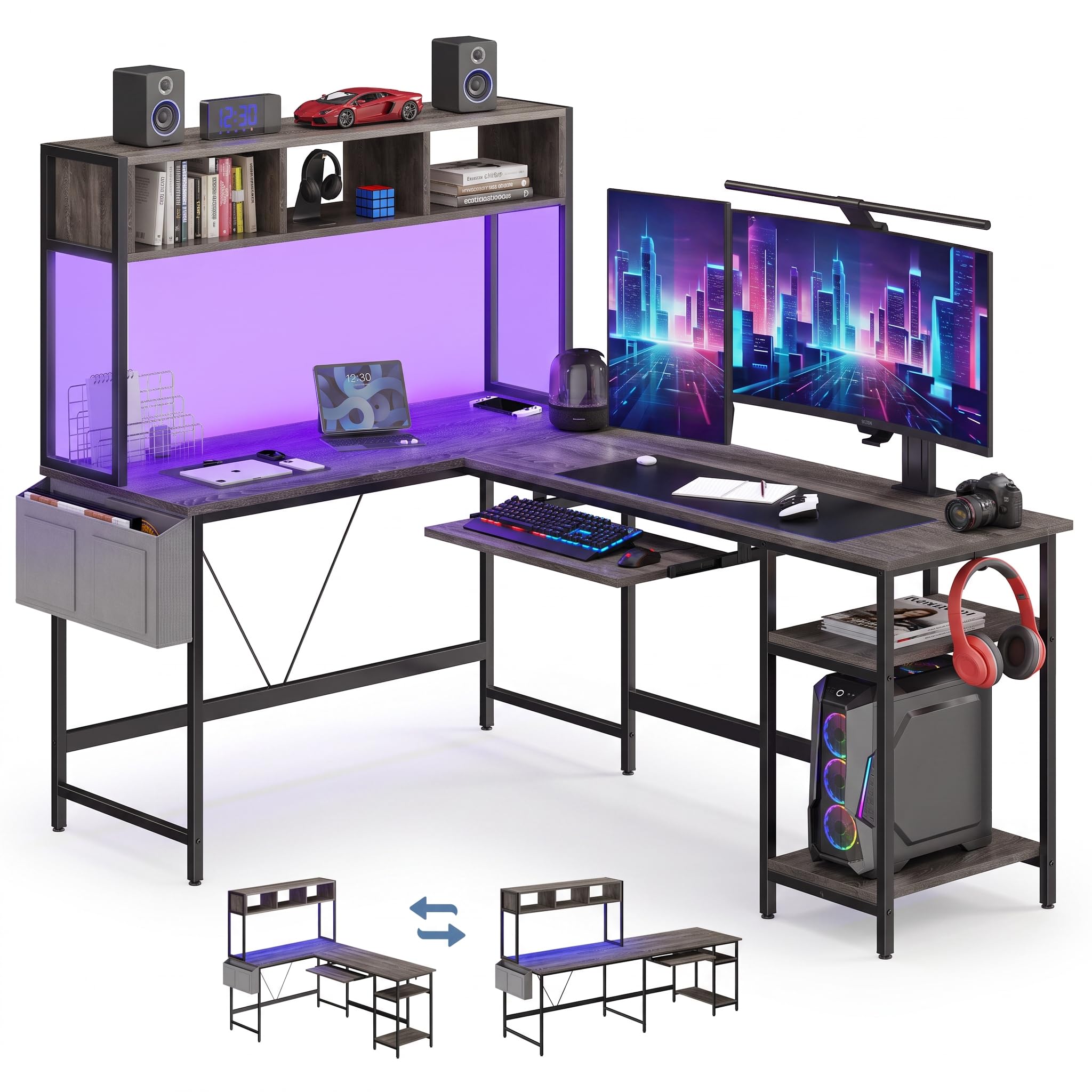
Corners are where desks usually go to waste, and this one is shaped to use them: a 67-inch L that assembles facing left or right, so the long run follows whichever wall you have. The keyboard tray sits in the inner corner, the metal frame is rated for 200 pounds, and a shelf and side pocket take the headset and the controller.

Adjustable leveling feet are the small thing that matters on a corner desk, since four contact points on an old floor is exactly where a wobble comes from, and a twist of the foot fixes it. We like that more than the lighting, honestly. The top is 0.75-inch MDF over the metal frame, and the RGB strip runs off a remote with colors and effects, which is either the reason you are buying it or a setting you will leave alone.

Two things to know before you order. Compact in the listing means it tucks into a corner, not that it is small, and 67 inches across is a real commitment of floor space. The build is also where fit issues show up: some screw holes run tight enough that forcing them costs you the thread, so start every one by hand and keep the adjustable feet doing the leveling.

Bottom Line: With the biggest surface and the highest load rating in this group, the DUMOS is what we point at a spare corner.
#5

Tight rooms

Yaheetech Computer Desk

Yaheetech Computer Desk

8.6/10 Excellent
  • Desktop: 42 x 20 in
  • Storage: Drawer, shelf, open cabinet
  • Keyboard Tray: Pull-out
  • Top Load Capacity: 110 lb
Check Price on Amazon

Pros

  • Tray, drawer, cabinet and shelf in 42 inches
  • 110 lb top rating and a 22 lb shelf
  • Veneer resists scratches and spills

Cons

  • MDF build with basic hardware

This is the budget end of the group, and it does not pretend otherwise: a 42 by 20-inch top, a pull-out keyboard tray, a drawer, an open cabinet and a full-width shelf above the work surface. It is the desk you buy when the room is small and the storage matters more than the surface.

That top shelf is what makes the layout work. It turns the space above the desk into somewhere for books, a printer or a monitor that will not fit on a 42-inch top, and it does it without a hutch deep enough to crowd your head. The veneered finish is scratch- and water-resistant, which is the right call for a desk that will hold drinks and homework.

Assembly is the part to brace for. The panels are MDF, the hardware is basic, and the whole thing is easier with two people and an afternoon, because overtightening is how you strip a hole in this material. It weighs 60.5 pounds and is rated to 110 pounds on the tabletop, 22 pounds on the compartment board and 11 pounds in the drawer, so load it like the budget desk it is.

We still recommend it, because nothing else here packs a tray, a drawer, shelves and a cabinet into this little floor space. Go in expecting a desk that gets the job done and holds a lot and it delivers; go in expecting furniture you will hand down and it will not.

Bottom Line: Buy the Yaheetech if you are furnishing a small room on a tight budget — we have not found another desk that fits a tray, a drawer, shelves and a cabinet into 42 inches.
#6

Teen bedrooms

Tangkula White Desk with Hutch

Tangkula White Desk with Hutch

8.8/10 Excellent
  • Desktop: 41.5 x 22 in
  • Storage: Drawer, hutch, adjustable shelf
  • Keyboard Tray: Pull-out
  • Top Thickness: 1 in
Check Price on Amazon

Pros

  • Hutch, drawer and adjustable shelf included
  • 1-inch top, the thickest here
  • Pull-out tray keeps the desktop free

Cons

  • Hardware can strip at the joints
  • 41.5-inch top suits one monitor

This is a bedroom desk, and it is honest about it: 41.5 by 22 inches, a hutch on top, a drawer, an adjustable shelf and a keyboard tray, all in white. It is the desk you put in the room where the computer is a laptop and the shelves are doing as much work as the desktop.

The 1-inch tabletop is the thickest in this group, which makes the whole thing read as more substantial than the rest of the build deserves, and the hutch gives you two levels without eating into the working surface. The tray pulls out under a top that stays clear for a monitor and a notebook.

Assembly is the part to plan for. The printed instructions are thin, the drawer slides are the fiddliest step, and the drilled holes are not always as clean as they could be, so start screws by hand and keep the packaging until it is standing. Doing it yourself takes an afternoon, not an hour.

The trade you make is hardware. Screw holes that do not hold turn up in some builds, and the 41.5-inch top is really a one-monitor surface with room for a laptop beside it. Neither matters much in the small white room this desk is built for, which is the whole point.

Bottom Line: The Tangkula earns its place in a teen's bedroom or a small study, where we think the hutch does more for the room than another six inches of desktop would.

How We Tested These Desks and Their Trays

We started with a list of about 40 desks that actually advertise a keyboard tray, which is a smaller group than it sounds, since plenty of ergonomic desks leave you to buy the tray separately. From there we compared published tray dimensions, height ranges, footprint options, weight capacity, and price, then narrowed it to 11 covering a spread of sizes and budgets.

Every desk was assembled from the box in a home office, start to finish, alone and with the instruction booklet open. We timed the build, noted where a diagram disagreed with the hardware bag or where a step quietly skipped a washer, and checked whether the pre-drilled holes for the tray brackets lined up without re-drilling. Two desks were taken apart and rebuilt when I moved them between rooms, which is a fair test of hardware quality; a few bolts and cam locks did not survive the second pass.

Then we worked at them, full eight-hour days, for six months. We measured each tray's width and depth, set a full-size keyboard and mouse on it, and rolled a chair in and out to see whether knees and armrests cleared. Each tray was slid in and out hundreds of times to catch rattles and slams, and we pressed our forearms into the front edge to watch the desktop flex on carpet and on hard floor. Drawers and shelves got filled with real desk clutter and cables were routed, then finishes were checked monthly for smudges and edge chips.

Value came last, weighing the final price against tray depth, storage, and how each desk looked and felt after the hardware had been loosened and re-tightened. Six months in, the desks that still felt solid and still let me sit square to the keyboard are the ones that made the list.

How to Choose the Right Desk with a Keyboard Tray

Start With the Tray Itself

A full-size keyboard runs about 18 inches wide, and a mouse needs roughly six more beside it, which is why the 24.4-inch tray on the HUANUO is the one we point to in this group. Anything narrower and the mouse migrates back to the desktop, and from then on you are reaching up and forward every few minutes. Depth counts too: a tray much under nine inches leaves the back of a full-size keyboard hanging over the edge. If you use a compact tenkeyless board you can go smaller, but check the depth before you assume a mouse fits beside it.

Check Your Knees Before Anything Else

A keyboard tray hangs below the desktop, and every inch it drops is an inch of knee clearance gone. Sit at the desk with your chair at its normal height before you commit. If you sit cross-legged, use a footrest, or like the chair pulled in tight, the tray is usually the first thing to come off, so find out whether it is a separate part you can remove before the box arrives rather than after.

Decide Whether You'll Actually Stand

The electric desks here run from 28.3 to 46.5 inches, which covers most standing positions, and the number that matters day to day is presets. Three or four memory buttons are what make switching happen, because holding a button while the desk climbs is how people stop bothering after a month. We put presets ahead of range for most buyers. If you already know you will not stand, a fixed-height desk buys more storage and thicker panels for the same money, and the Bestier and Tangkula desks here are the evidence.

Storage, Power and Cable Management

A file drawer, a couple of outlets in the top, a cable hole behind a cubby: these are the details that decide whether the desktop stays clear enough for the tray to be worth having. Built-in power earns more than it sounds. Two outlets plus USB-A and USB-C in the Bestier top take a charger, a monitor and a lamp off the floor. Watch the monitor riser too. A full-width shelf frees desk space but pushes the screen back, so measure the distance you sit from your screen now.

Plan the Build Before It Arrives

These desks arrive flat and heavy, roughly 53 to 82 pounds in this group, and the pedestal models take longest. We build them with two people and an evening. A power driver saves your wrists on the screw count, but it overtightens MDF faster than you would think, so run the last turns by hand. Keep the hardware bags labeled, lay the panels out before you start, and do not build it in the room if the doorway is tight.

Frequently Asked Questions

Final Verdict

We send most people to the OffiGo. It is the only desk here that gets the tray right sitting and standing, and the integrated monitor riser means one purchase solves the whole setup rather than half of it.

If the tray itself is the deciding feature, the HUANUO's is the widest in this group and takes a keyboard and mouse together. If you have a corner and no interest in standing, the DUMOS fills it with the biggest surface and the highest load rating here. And when the budget is the constraint, the Yaheetech packs the most storage into the smallest footprint.